Turn a call recording into action items from Claude

AgentLeverage Team
9/29/2026

Your team's standup ends. Someone said the launch is still on the 15th if legal answers by Thursday. Someone else said they would send the customer email. Ten minutes later, nobody agrees on who promised what.
You have the recording. You also have Claude open, because that is where you were already writing the follow-ups. What you need is the recording turned into a list of who owns what, without leaving the chat.
That is what connecting Claude to AgentLeverage gives you. Claude runs Speaker Separation on your file, reads the result, and answers in the conversation you are already having.
Connect Claude once
Add AgentLeverage to Claude as a custom connector and sign in. The steps are in Connecting your agent, and it takes a few minutes. After that, the AgentLeverage tools are available in any Claude chat. Claude asks your permission the first time it uses them.
Ask for the outcome you want
Upload the recording to your workspace, then describe the job in plain language. Something like: run speaker separation on the standup recording, show me who said what, and list the action items with owners.
Claude starts the job, waits for it to finish, and reads the labeled transcript. Here is what came back for a 28-second sample standup:
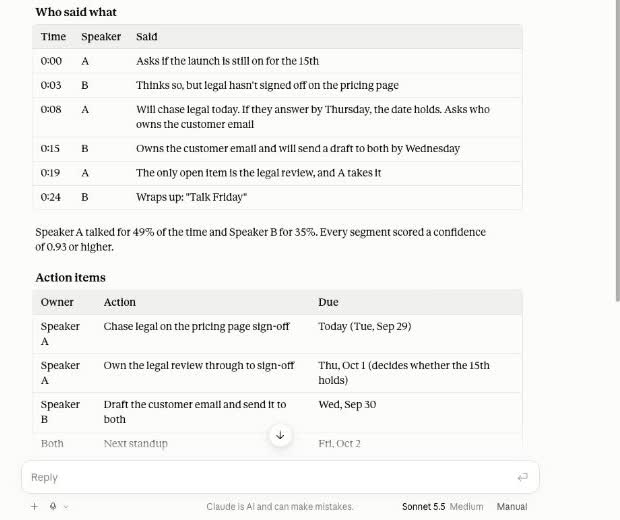
A timestamped who-said-what table, talk-time shares, and action items with owners and due dates, all in the chat.
You get the conversation turn by turn with timestamps, how much of the time each person spoke, and a confidence score for each segment. Claude then turns it into commitments:
- Chase legal on the pricing page sign-off today.
- Own the legal review through Thursday.
- Draft the customer email and send it by Wednesday.
- Hold the next standup on Friday.
It also pulls out the decision that is easy to lose: the launch date holds only if legal answers by Thursday.
The record stays in your workspace
The chat gives you the answer. The job itself stays in your AgentLeverage workspace, with the labeled transcript, the isolated audio for each voice, and txt and srt exports. You can open it later, rename Speaker A and Speaker B to real names, and export a copy. Renaming is what turns "Speaker A owns the legal review" into an assignment.
If you would rather skip the chat, the same run works in the browser. The step-by-step guide to splitting audio by speaker covers that path, and Move past Speaker 1 chat paste explains why the labeled file matters more than the recap.
Good to know
- Labels are Speaker A and Speaker B, not names. AgentLeverage does not know your team. Rename the labels in the app, or tell Claude who is who and ask it to reword the action items.
- Similar voices can be merged. If you know how many people were on the call, set the expected speaker count. Skim any turn where two people talk over each other.
- It is a working transcript, not a certified record. For anything a court, regulator, or contract will rely on, use the process your matter already requires.
- Cost. Guest Speaker Separation in the browser is free, up to 2 runs a day. Runs from a connected agent use your signed-in workspace credits: 2 credits per minute of audio, rounded up. New accounts start with 30 credits. See pricing.
- Retention. Signed-in jobs and files stay in your workspace until you delete them. Guest uploads expire after 7 days.
For a call-heavy team, the remote meetings guide has recording tips that improve the split, and how speaker diarization works explains why some voices are harder to separate. If your agent already writes your recaps, Still copy-pasting from your agent shows the rest of what a connected agent can run.
Try it yourself
Speaker Separation
Upload a recording. This speaker separation labels multi-speaker audio. Rename Speaker 1 and download isolated stems plus a timestamped transcript.
Start with 30 free credits — no card required.
Related Articles
Still Untangling Who Spoke? Audio Diarization Tool
Still reading a nameless wall of text? An audio diarization tool labels who spoke. You still rename Speaker 1 and review. Guest 2/day.
Move past Speaker 1 chat paste with Speaker Separation
Chat has the recap. The file still says Speaker 1. Label, rename, export txt/srt. Guest Speaker Separation is 2/day. Signed-in orgs pay 2 credits/min.
Move past chat-only agents and copy-paste with AgentLeverage
Chat-only agents leave the invoice PDF in the paste buffer. Hermes and Claude start AgentLeverage Jobs you still review.
Get weekly AI tips
Practical AI productivity tips every week. No fluff.