Call Recording to Minutes in n8n

AgentLeverage Team
10/7/2026
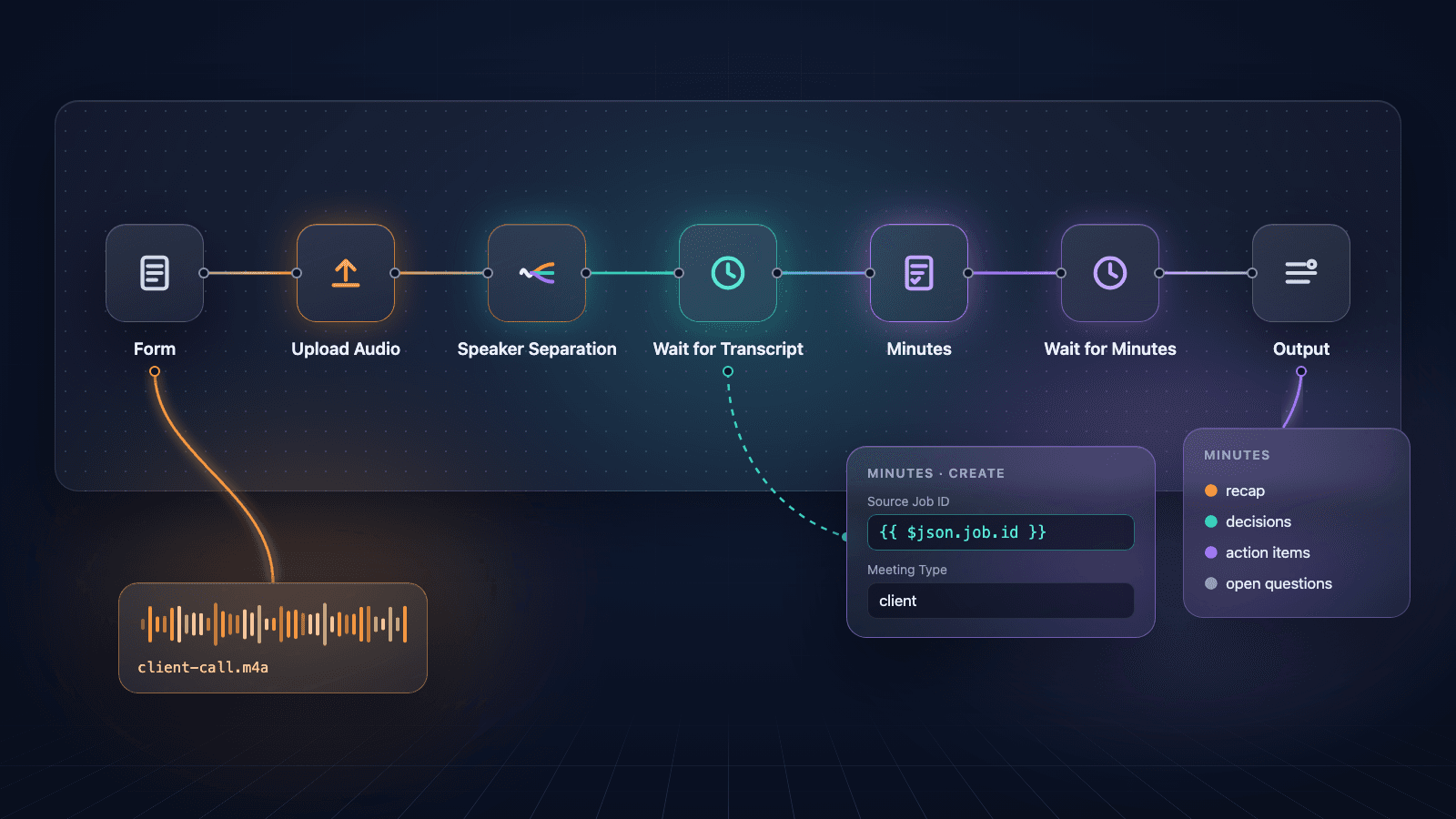
You export a Zoom, Meet, or Teams recording and still do not have minutes. Every line says Speaker 1. The owner of "I'll send the follow-up" is whoever remembers. The next call starts from three different recaps.
AgentLeverage already runs that sequence in the browser: upload the audio, Speaker Separation labels who spoke, then Minutes drafts the recap from that job. If the recording already lands in n8n, the same sequence is an importable workflow. The template is call-recording-to-minutes.json. The community node that powers it is n8n-nodes-agentleverage 0.1.0, published with provenance. Install it from Settings > Community Nodes or with npm in ~/.n8n/nodes. Source is Life-With-Data/n8n-agentleverage. You still rename Speaker A and review owners before you send the recap.
What the n8n flow returns
The n8n template uploads a call recording, runs AgentLeverage Speaker Separation, waits for the labeled transcript, then starts Minutes with that job as sourceJobId. The last node outputs the Minutes job and its recap, decisions, and action items. The workflow does not join the call and does not invent names. Speaker Separation charges 2 credits per minute of audio, rounded up. Minutes charges 2 credits per run and needs a signed-in org.
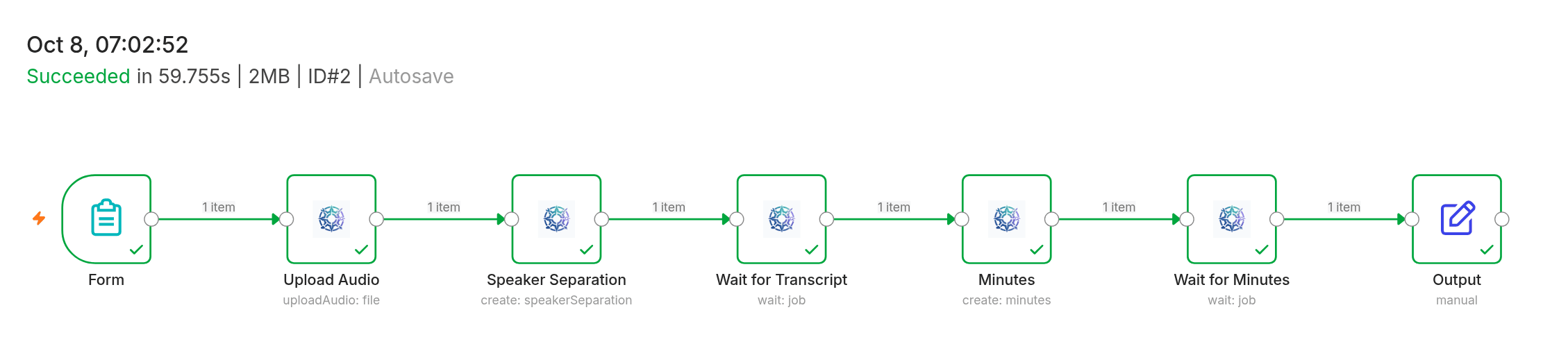
A real run in self-hosted n8n 2.42.5 with n8n-nodes-agentleverage 0.1.0. Every node succeeded on a 64-second, two-speaker test call.
Each Agent Leverage node uses the API token from Settings → API tokens. The Form node is stock n8n. Output is a Set node with jobId, status, and minutes.
Install the community node
n8n-nodes-agentleverage is on npm as 0.1.0, published with provenance. The source repo is Life-With-Data/n8n-agentleverage. Self-hosted n8n can install it from the UI or the CLI.
n8n UI
- Open Settings > Community Nodes.
- Select Install.
- Enter
n8n-nodes-agentleverage. - Agree to the risk warning and install.
Self-hosted CLI
cd ~/.n8n/nodes
npm install n8n-nodes-agentleverage
Restart n8n after the CLI install. The Agent Leverage node should show up in the node picker. Add a credential named Agent Leverage API: the production URL is https://www.agentleverage.co, and the API key is the token from Settings → API tokens.
n8n Cloud only lists verified community nodes. This package is on npm with provenance; Creator Portal verification is a separate review. Use self-hosted n8n until that verification lands.
Import the workflow from URL
AgentLeverage hosts the importable template at https://www.agentleverage.co/n8n/call-recording-to-minutes.json. In self-hosted n8n, use File → Import from URL and paste that address. The JSON is the Form → Upload Audio → Speaker Separation → Wait → Minutes (sourceJobId) → Wait → Output chain. After import, attach the Agent Leverage credential to every Agent Leverage node. The Form trigger accepts one file: MP3, WAV, M4A, OGG, WEBM, or FLAC. Open the form URL n8n prints, upload a recording, and submit.
https://www.agentleverage.co/n8n/call-recording-to-minutes.jsonWalk the nodes
The template is seven nodes: Form, Upload Audio, Speaker Separation, Wait for Transcript, Minutes, Wait for Minutes, and Output. Form and Output are stock n8n. The five in the middle are Agent Leverage nodes on one credential. Speaker Separation starts a job from the uploaded file. Minutes starts a second job from that job's id (sourceJobId). You still rename Speaker A in AgentLeverage after the run.
1. Form
The Form trigger collects one recording. The field label is Recording, which Upload Audio reads. Leave that name unless you change both nodes.
2. Upload Audio
Upload Audio stores the form file in your AgentLeverage workspace and returns a storage path as audioFileUrl. This workflow uses the signed-in org behind the API token.
3. Speaker Separation
Speaker Separation starts from that storage path and returns a job immediately. Add an expected speaker count on the node if you know how many people were on the call.
4. Wait for Transcript
Wait polls the Speaker Separation job every 5 seconds, for up to 10 minutes. The labeled transcript (Speaker A, Speaker B, timestamps) sits on that job. Isolated stems and txt/srt export still live in the AgentLeverage UI.
5. Minutes (sourceJobId)
Minutes does not take the audio again. The template sets Source Job ID to the completed Speaker Separation job (={{ $json.job.id }}) and meetingType to client. Minutes reads the labeled transcript from that job and creates a new Minutes job. The Speaker Separation job is not changed or deleted.
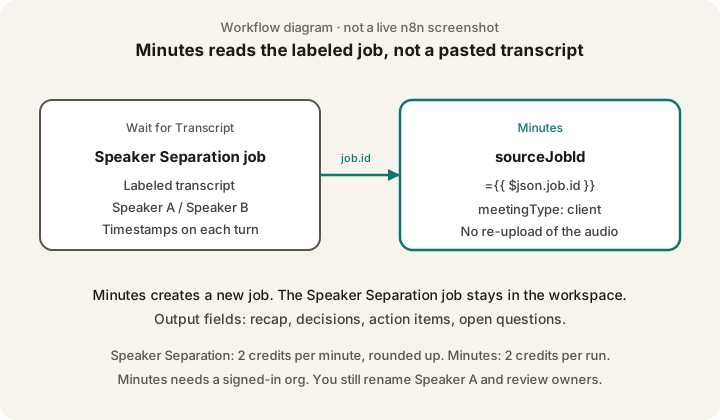
Minutes reads the labeled job. It does not re-upload the recording.
6. Wait for Minutes, then Output
Wait polls the Minutes job the same way (5 seconds, 10 minutes). Output keeps jobId, status, and minutes (the job output). That output includes a recap, decisions, action items with an assignee and due date when those were said, open questions, and speaker labels from the source job.
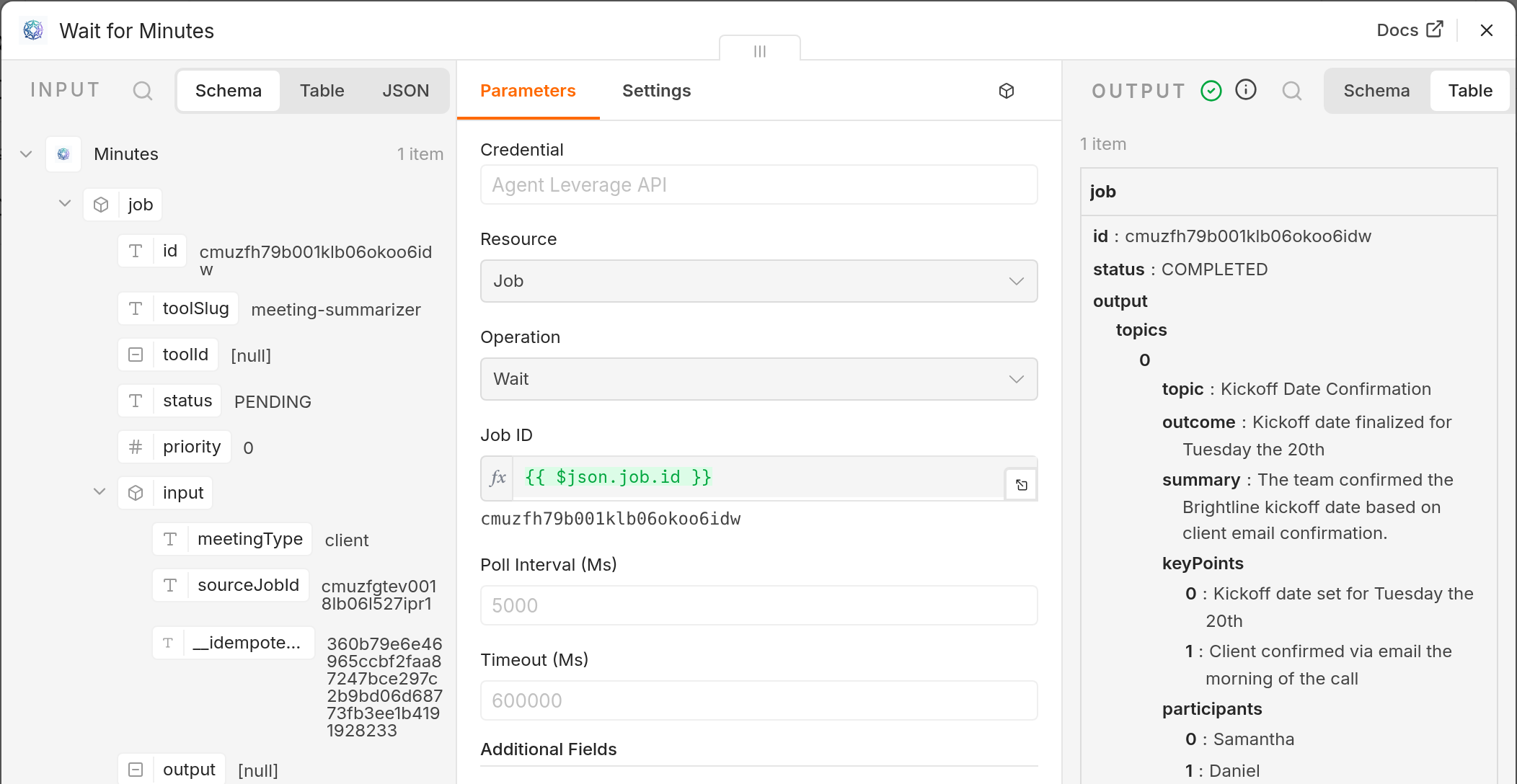
Wait for Minutes output from the same run. Minutes read the completed Speaker Separation job by sourceJobId.
What you still review
Minutes copies what was said on a working labeled transcript from Speaker Separation. It does not invent names, certify a legal record, or fill owners and due dates that were never said. AgentLeverage Speaker Separation still labels Speaker A and Speaker B. You rename those labels in the app, then check overlapping turns before you send the recap. Isolated stems on the Speaker Separation job help when two people talk at once.
Before you send the recap, drop owners and dates that were never said, and check names and numbers. Signed-in jobs stay until you delete them.
Cost and limits
Speaker Separation is 2 credits per minute of audio, rounded up. Minutes is 2 credits per run. New accounts start with 30 credits and no card. Pack credits never expire. Included credits do not carry forward. At zero credits, runs pause. See pricing.
Minutes is not a guest tool. The API token belongs to a signed-in org. Speaker Separation in the browser is still free for guests at 2 runs per day.
Wait nodes time out at 10 minutes. Raise timeoutMs on both Wait nodes for a long recording, or finish Minutes in the app.
The same sequence from a prompt
If you already live in Claude or ChatGPT, you do not need n8n for a single recording. Connect AgentLeverage once and paste a prompt that runs Speaker Separation, then Minutes from that job.
If the recording is already in chat and you want the same Speaker Separation then Minutes sequence: run it from a prompt in Claude or ChatGPT
If you would rather skip n8n and upload in the browser: split the file by speaker first, then open Minutes
Good to know
- Install from npm. In the n8n UI: Settings > Community Nodes > Install, then enter
n8n-nodes-agentleverage. On the CLI:npm install n8n-nodes-agentleveragein~/.n8n/nodes, then restart n8n. Package: n8n-nodes-agentleverage. Source: n8n-agentleverage. - n8n Cloud will not list it until Creator Portal verification lands.
- Labels are Speaker A, not names. AgentLeverage does not know your team.
- This is a working transcript and a first-pass recap, not a certified legal or medical record. For a court, regulator, or contract exhibit, use the process your matter already requires.
Frequently asked questions
Can I install n8n-nodes-agentleverage from npm today?
Yes. The package is n8n-nodes-agentleverage 0.1.0. Install from Settings > Community Nodes > Install, or run npm install n8n-nodes-agentleverage in ~/.n8n/nodes and restart n8n.
What is sourceJobId?
On the Minutes node, Source Job ID is the completed Speaker Separation job in the same org. Minutes builds the recap from that labeled transcript. It does not re-upload audio and does not change the source job.
Do I still need to review the minutes?
Yes. Rename Speaker A, check overlapping turns, and confirm owners and dates before you send the recap.
Try it yourself
Minutes
Paste notes or a transcript. Get a recap with decisions, owners, and action items. Minutes does not transcribe.
Start with 30 free credits — no card required.
Related Articles
The same sequence with a simple prompt in Claude or ChatGPT
Paste a prompt in Claude or ChatGPT that runs Speaker Separation, then Minutes from that job. You still rename Speaker A and review.
Turn a call recording into action items from Claude
Ask Claude to split a recording by speaker and hand back who said what, with owners and due dates. Connect AgentLeverage once, then do it from chat.
Still Untangling Who Spoke? Audio Diarization Tool
Still reading a nameless wall of text? An audio diarization tool labels who spoke. You still rename Speaker 1 and review. Guest 2/day.
Get weekly AI tips
Practical AI productivity tips every week. No fluff.