The same sequence with a simple prompt in Claude or ChatGPT

AgentLeverage Team
10/8/2026
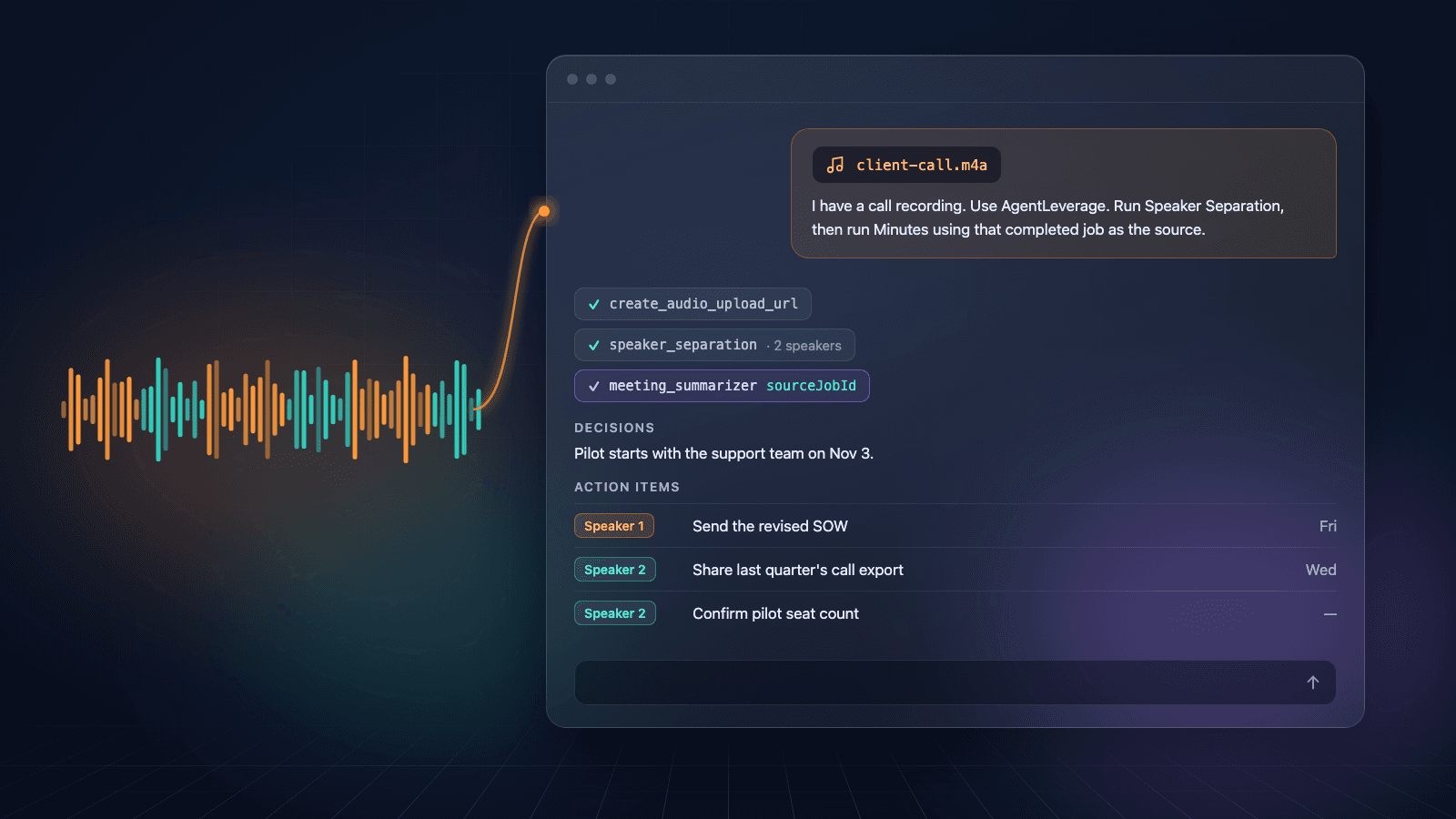
You have the recording. You also have Claude or ChatGPT open, because that is where you were already writing the follow-up. You still do not have minutes with owners, and the file still says Speaker 1.
Connect AgentLeverage once. Paste the prompt below. The agent uploads or picks the recording, runs Speaker Separation, then runs Minutes using that completed job as the source. The recap, decisions, and action items come back in the thread. The jobs stay in your workspace so you can rename Speaker A and review before you send anything. We test this on Claude's custom connector. ChatGPT Developer-mode connectors should work the same way; we do not verify ChatGPT ourselves.
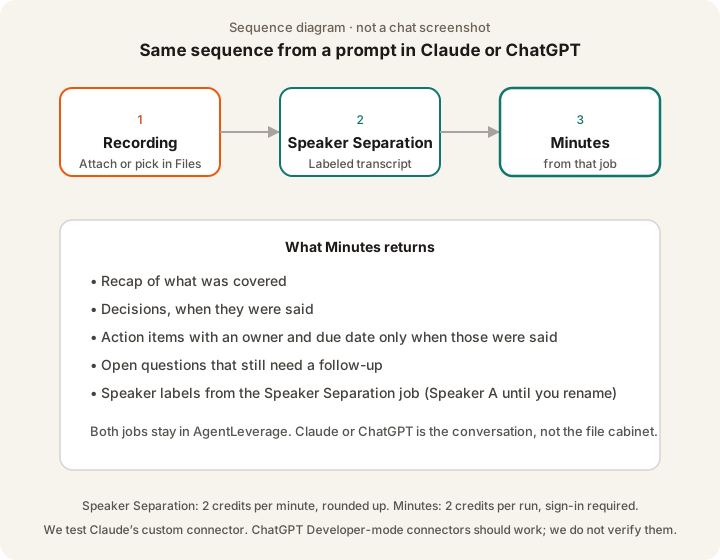
Sequence diagram of the prompt. Not a chat screenshot.
Connect AgentLeverage once
Claude's custom connector is the path we test. In Claude, open Settings → Connectors, add a custom connector, and paste the connector URL from your signed-in Agents page. The steps are in Connecting your agent. Sign in, pick the org that should own the jobs, and approve access. Claude asks permission the first time it uses a tool.
ChatGPT's Developer-mode connectors use the same OAuth flow. We test Claude and Cursor. Other clients should work. If a client has no connector UI, fall back to an API token in that client's config, using the shapes on the connecting-your-agent page.
Pick the right organization when you approve. The connector is bound to the org that was active. To point it at a different org, remove the connector and add it again.
Copy-paste prompt
Connect AgentLeverage, attach the recording, and paste the prompt below. The prompt tells Claude or ChatGPT to run Speaker Separation on the file, then run Minutes using that completed job as the source. Ask it not to write the recap from the transcript in chat. Change the speaker count and meeting type if you know them. Keep Speaker A until you rename the labels in AgentLeverage.
I have a call recording. Use AgentLeverage.

1. Put this recording in my AgentLeverage workspace. If I already uploaded it, use that Files entry instead of uploading again.
2. Run Speaker Separation on that file. If I tell you how many people were on the call, set that expected speaker count. Otherwise let it detect the count.
3. When Speaker Separation finishes, run Minutes using that completed Speaker Separation job as the source. Do not paste the transcript into Minutes by hand. Do not write the minutes yourself from the transcript.
4. Return:
   - the recap
   - decisions, only when they were said
   - action items with owners and due dates, only when those were said
   - open questions
   Keep Speaker A / Speaker B until I rename them.
5. Tell me where to open both jobs in AgentLeverage so I can rename speakers and review before I send the recap.

Meeting type: client.
Expected speakers: (leave blank unless I specify a number).
Step 3 runs Minutes on the Speaker Separation job. Turn a call recording into action items from Claude is the path where Claude writes the action list from the transcript. This prompt files a Minutes job you can reopen next week.
If the model starts summarizing the audio itself, stop it and paste step 3 again. Minutes needs the completed Speaker Separation job, not a transcript pasted into the prompt.
What comes back
Minutes returns a recap, decisions, action items (assignee and due date when those were said), open questions, and speaker labels from the Speaker Separation job. Owners that were never named stay empty. Due dates that were never said stay empty. Minutes should not fill those from guesswork. You still rename Speaker A and skim overlapping turns before you send the recap.
The chat is the conversation. The record is the two jobs in AgentLeverage: Speaker Separation (labeled transcript, stems, txt/srt) and Minutes (the recap). Rename Speaker A on the Speaker Separation job, then read the Minutes output with real names in mind. You still check overlapping turns.
Speaker Separation from a connected agent spends workspace credits: 2 credits per minute of audio, rounded up. Minutes is 2 credits per run and is not available as a guest tool. New accounts start with 30 credits. Guest Speaker Separation in the browser is still 2 runs per day, which is a separate path from this prompt.
The same sequence in n8n
If every recording already hits n8n, import the workflow instead of pasting a prompt each time. The AgentLeverage template at /n8n/call-recording-to-minutes.json is Form → Upload Audio → Speaker Separation → Minutes (sourceJobId) → Output. Install n8n-nodes-agentleverage from Settings > Community Nodes > Install, or run npm install n8n-nodes-agentleverage in ~/.n8n/nodes and restart n8n. Source is Life-With-Data/n8n-agentleverage. You still rename Speaker A and review owners.
If the file already lands in n8n: import the call-recording-to-minutes workflow
If you want the browser upload with no chat and no n8n: split speakers first, then open Minutes
Good to know
- We test Claude and Cursor. ChatGPT Developer-mode connectors should work. Treat a ChatGPT run as unverified until you see both jobs in your workspace.
- Labels are Speaker A, not names. Tell the agent who is who after you rename, or rename in the app and ask it to rewrite the action items.
- Overlapping speech can land on the wrong person. Skim those turns. Isolated stems on the Speaker Separation job help.
- Working transcript, not a certified record. Court, medical, and contract exhibits still need the process your matter already uses.
- Retention. Signed-in jobs and files stay until you delete them. Guest browser uploads expire after 7 days.
Frequently asked questions
Does this prompt write the minutes in the chat, or run Minutes?
It should run Minutes from the completed Speaker Separation job. If the agent only writes a recap in chat, paste step 3 again. You want a Minutes job in the workspace.
Can ChatGPT run this today?
ChatGPT Developer-mode connectors use the same OAuth flow as Claude. We do not verify ChatGPT. Open Jobs after the run. If both jobs are there, the connector worked.
Do I need to paste the transcript?
No. Minutes should read the Speaker Separation job. Paste notes only when you already have text and no Speaker Separation job.
What does this cost?
Speaker Separation is 2 credits per minute, rounded up. Minutes is 2 credits per run. See pricing. You still review before you send the recap.
Try it yourself
Minutes
Paste notes or a transcript. Get a recap with decisions, owners, and action items. Minutes does not transcribe.
Start with 30 free credits — no card required.
Related Articles
Call Recording to Minutes in n8n
Upload a call recording in n8n, run Speaker Separation, then Minutes from that job. Install n8n-nodes-agentleverage. You still rename Speaker A and review.
Turn a call recording into action items from Claude
Ask Claude to split a recording by speaker and hand back who said what, with owners and due dates. Connect AgentLeverage once, then do it from chat.
Still Untangling Who Spoke? Audio Diarization Tool
Still reading a nameless wall of text? An audio diarization tool labels who spoke. You still rename Speaker 1 and review. Guest 2/day.
Get weekly AI tips
Practical AI productivity tips every week. No fluff.